


Poslal: Yullaw
« kdy: Března 26, 2013, 20:22:21 »Ahoj, možná by ti pomohly některé informace z
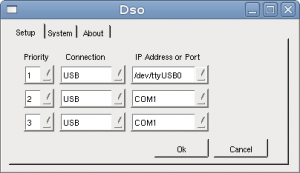
Můžeš sem také přihodit popis tvého hardwaru a typ zařízení analyzéru.
EDIT: + další informace
- http://www.endolith.com/wordpress/2008/06/17/bitscope, kde také popisuje problém s komunikací:
Kód: [Vybrat]
So then it continually popped up the .csv import screen, indicating that it can’t connect to the hardware.
Eventually I figured out that I had the wrong thing entered in the configuration dialog.
Press the SETUP button and put /dev/ttyUSB0 in the IP Address or Port box under the Setup tab.- Další informace o nastavení na stránce BitScope DSO - setup and startup
Můžeš sem také přihodit popis tvého hardwaru a typ zařízení analyzéru.
EDIT: + další informace
